GitHub Webhook
Trigger Aisle workflows from GitHub events - push events, pull request activity, releases, and more.
Connector Setup
First, connect the GitHub integration from the Connectors page.
Setup Instructions
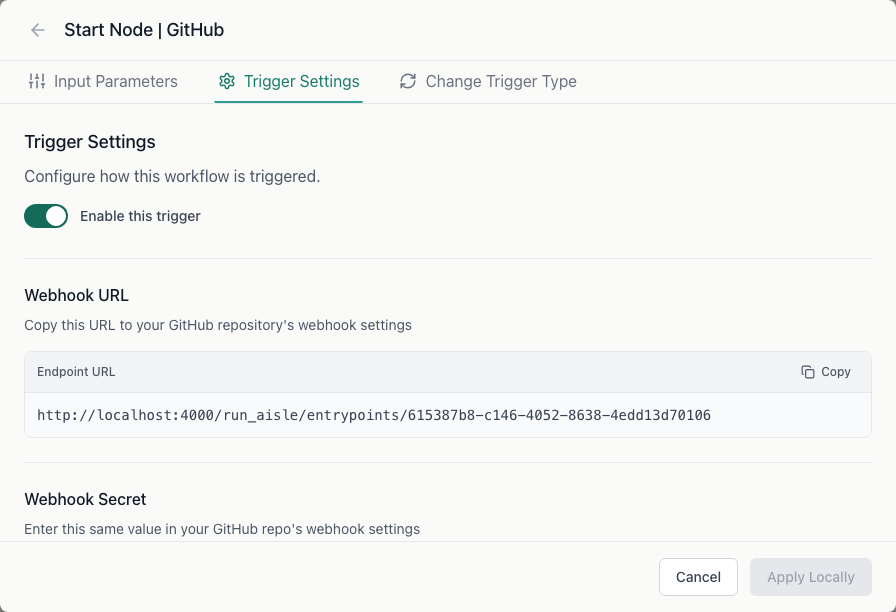
Step 1: Create the workflow
Create a new workflow and select GitHub as the trigger type.
Step 2: Configure trigger settings
In the workflow's Trigger Settings tab:
- Webhook Secret - a secret string you generate. You'll enter this in GitHub too. Aisle uses it to verify that incoming requests are genuinely from GitHub.
- Event Types - the GitHub events that should trigger this workflow (e.g.,
push,pull_request,release,workflow_run).
Copy the webhook URL shown in the trigger settings.
Step 3: Add the webhook in GitHub
In your GitHub repository, go to Settings > Webhooks > Add webhook.
- Payload URL - paste the webhook URL from Aisle
- Content type -
application/json - Secret - paste the same webhook secret you configured in Aisle
- Which events - select the events you want to trigger the workflow
Click Add webhook. GitHub will send a test ping to verify the URL is reachable.
Workflow input variables
When a GitHub event fires, these variables are available in your workflow:
| Variable | Description |
|---|---|
event_type | GitHub event type (push, pull_request, release, etc.) |
action | Action qualifier (opened, closed, created, etc.) |
repository | Repository full name (owner/repo) |
repository_url | Repository URL |
sender | GitHub username of the actor |
ref | Git ref (branch or tag) |
sha | Commit SHA |
branch | Branch name |
payload | Complete raw GitHub webhook payload |
Pull request events additionally provide:
| Variable | Description |
|---|---|
pr_number | Pull request number |
pr_title | PR title |
pr_body | PR description |
pr_state | PR state (open, closed) |
pr_url | PR URL |
head_branch | Source branch |
base_branch | Target branch |
head_sha | Head commit SHA |
Push events additionally provide:
| Variable | Description |
|---|---|
commits | Array of commit objects |
head_commit_message | Most recent commit message |
compare_url | URL comparing before/after |
Release events additionally provide:
| Variable | Description |
|---|---|
tag_name | Release tag |
release_name | Release title |
release_body | Release notes |
prerelease | Whether this is a pre-release |
release_url | Release URL |
Troubleshooting
Webhook not triggering - Verify the event types configured in Aisle match the events selected in GitHub. Check that the webhook secret matches exactly in both places.
Signature verification failed - The webhook secret in Aisle does not match what was entered in GitHub. Update one to match the other.