Build AI workflows in Python.
company = aisle.inputs.get("company")deal = aisle.integrations.pipedrive.search_deals(org_name=company,)[0]news = aisle.ai.gemini_google_search(f"{company} news since {aisle.run.last_run_at}")notes = aisle.memories.search(company,folder="crm-notes",limit=5,)brief = aisle.ai.run_prompt(slug="account-brief",deal=deal,news=news,notes=notes,)aisle.create_chat("Account brief", brief)
Made for developers.
Everything around your code is handled. You write the logic, and Aisle runs the rest.
Auto-deploys to a managed runtime
Press save and your implementation is online. Every LLM binding and integration is already wired in. No deploy step, no servers.
Revisions
Git-style revisions on every save. Follow each change and roll back in a click.
Durable and accountable
A durable architecture with retries, logging, and a full audit trail. Checkpoints remember your place in a long-running flow.
Cache
Cache information between runs so repeated work stays fast.
Files
Build, create, manage, upload, and distribute files to users. All inline and easy.
Trigger a task from anywhere.
Run on demand, on a schedule, on an HTTP request, or in response to an event from any connected integration.








Easy to share with your non-programmer team.
Easier to maintain than a node graph.
A canvas is hard to manage. Changes are onerous and tough to follow. A task moves the problem into code, where logic is easier to reason about, faster to modify, and version tracking is fast and simple.
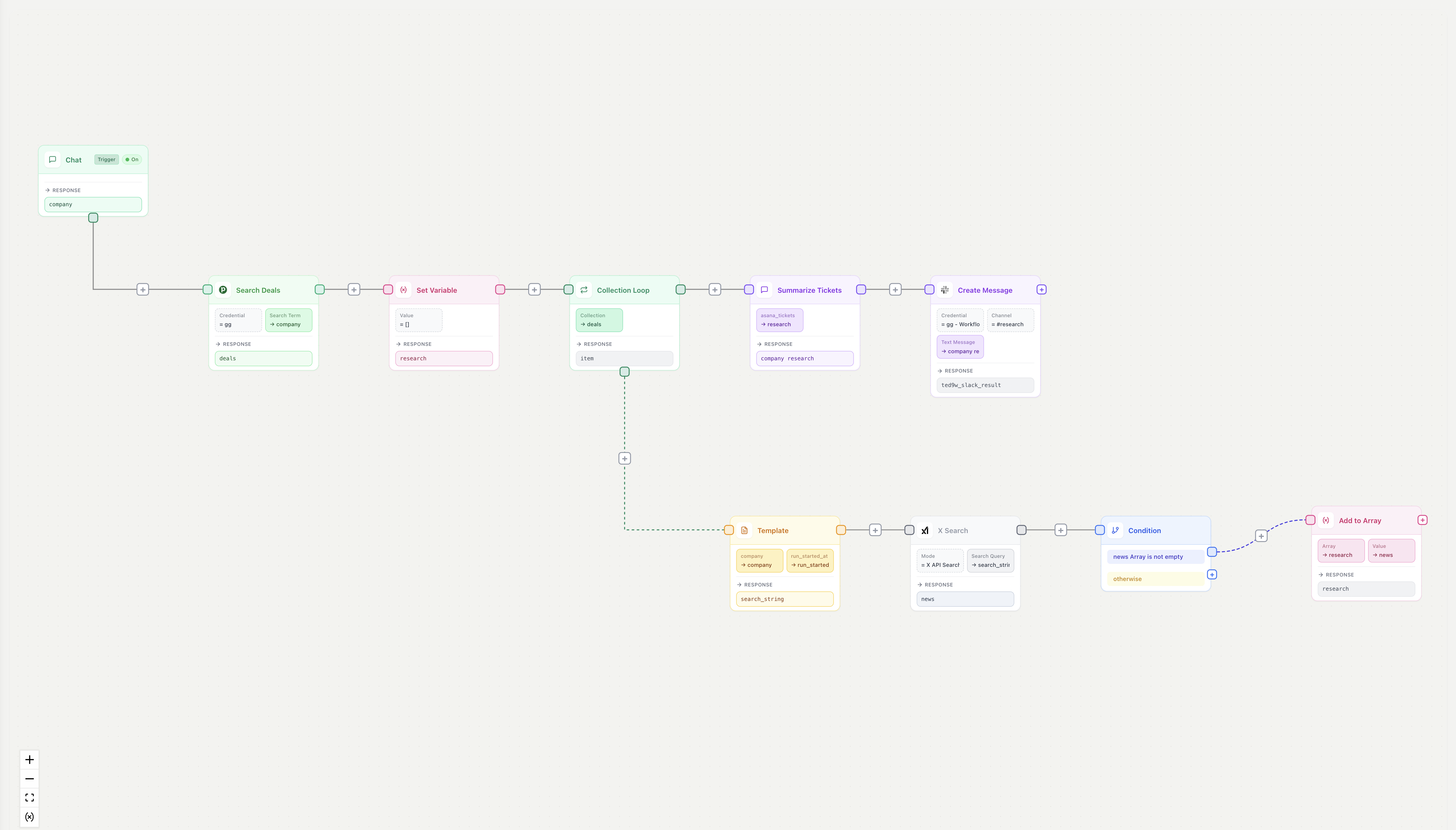
# Find every open deal at this company.
company = aisle.inputs.get("company")
deals = aisle.integrations.pipedrive.search_deals(
    org_name=company,
)

# For each deal, grab news since the last run.
research = []
for deal in deals:
    news = aisle.ai.gemini_google_search(
        f"{company} news since {aisle.run.last_run_at}"
    )
    if news:
        research.append({"deal": deal, "news": news})

# Hand the lot to a saved prompt to write the brief.
brief = aisle.ai.run_prompt(
    slug="account-brief",
    research=research,
)

aisle.integrations.slack.send_message(
    channel="#revenue",
    text=brief,
)
Write your first task in the editor.
Free plan includes the runtime, integrations, and revision history.
Tasks alongside the rest of Aisle
Tasks share state, prompts, and memory with the other building blocks. Reach for the shape that fits.
Projects
A shared home for a team or domain. Tasks live in a project alongside its prompts, memories, and connectors.
Learn moreMemories
Search and store knowledge from inside a task with a single call. No vector database to provision.
Learn moreReusable Prompts
Saved prompts a task calls by slug. Edit the prompt and every task that references it updates with it.
Learn moreWrite your first task.
Open the editor, write a script, and run it against your connected accounts.