company = aisle.inputs.get("company")deal = aisle.integrations.pipedrive.search_deals(org_name=company,)[0]news = aisle.ai.gemini_google_search(f"{company} news since {aisle.run.last_run_at}")notes = aisle.memories.search(company,folder="crm-notes",limit=5,)brief = aisle.ai.run_prompt(slug="account-brief",deal=deal,news=news,notes=notes,)aisle.create_chat("Account brief", brief)
Model and provider agnostic.
 Anthropic
 OpenAI
 Gemini
 xAI
xAI OpenRouter
 Amazon
 Perplexity
 MoonshotAI
 Meta
Meta Qwen
Qwen
Aisle Tasks
A Task is a deterministic AI automation you build in Python. Unlike an agent that decides as it goes, or a workflow builder bound to a canvas, a Task treats your automation like a real application.
A Task
AisleDeterministic AI workflow in code. As expressive as a program, maintained and tested like software. Treats the implementation like an application.
An Agent
Claude · ChatGPT · Aisle ProjectsOne model deciding as it goes. Flexible for open-ended work a person steers, but non-deterministic, and can burn a lot of tokens.
A Workflow Builder
Zapier · n8nA visual canvas wiring fixed steps together. Deterministic, but the canvas caps how much logic it can express, and every change means re-wiring it.
The SDK
aisle.ai
A model-agnostic, versioned prompt platform. The model is a field on the prompt, interchangeable across OpenAI, Anthropic, Gemini, Grok, and OpenRouter without changing your code. Every native model feature is built in: structured outputs, file and image inputs, and web search.
aisle.integrations
Read from and write to a connected service in one call. Real API calls made server-side, not routed through a model. They don't burn tokens: typed, direct, and identical every run.


aisle.files
Read, write, and convert doc, xlsx, and pptx. Split and recombine PDFs, fill a PowerPoint template, zip outputs, and get a presigned download URL back.
aisle.memories
Generate a RAG database from content (PDFs, docs, and more) on the fly, or store markdown files and JSON objects between agentic runs. No vector DB or embedding pipeline to stand up.
The rest of the SDK
Eight more modules. Open one for what it does and a sample call.
Provides a task-scoped key-value store with get, set, and a required TTL. Holds an expensive result, such as an API pull or a model call, so a later run reuses it until it expires.
Searches and reads the chat threads of the person running the task, and only that person's threads. Shows a consent banner on the run form. Turns prior conversations into task input.
Records that a unit of work finished, under a key you choose. On retry, aisle.checkpoint.done() reports which keys were already marked, so work you guard runs once and its model calls and side effects are not repeated. A Slack post inside that guard does not post twice.
Reaches any HTTP API through a protected request helper, so an internal or niche service with no prebuilt connector still works from the same script. Returns status, headers, and body for the next step to use.
Reads run inputs with aisle.inputs.get, merging the trigger payload with values a person entered. You declare each input with a type, including text, number, date, select, file, and credential, and Aisle renders those declarations as a run form, so a teammate reruns the task by filling fields. A credential input lets the runner pick which account the task acts on.
Fans a function out over a list and collects the results. Takes concurrency, a per-minute rate limit, retries, and an optional checkpoint name as arguments, so fan-out over hundreds of items stays a single call. Pass checkpoint= and each completed item is recorded and skipped on retry.
Fills {{placeholders}} in a PPTX file and preserves the original formatting, so a recurring deck generates from the template the team already approved. Placeholder keys are word characters only.
Exposes the execution id for correlating against logs, the task author, the person who pressed Run, the company and project, timestamps, and a test-run flag. aisle.run.last_run_at returns the previous successful run’s time, and None on the first run, so "process everything since last run" is one property.
Managed deployment and runtime.
Auto-deploys on save
Press save and the new version is live. No deploy step, no servers.
Revisions and rollback
A revision on every save. Follow each change and roll back in a click.
Durable runs
Retries, checkpoints that resume a long flow, and timeouts.
Logged and audited
Every run records status, inputs, output, errors, and what triggered it.
Easy model upgrades
Swap or upgrade the model behind any step with an edit. No rewrite, no redeploy.
Almost no upkeep
No runtime to patch, no dependencies to drift, no servers to keep alive.
Flexible distribution.
Start a task however you like - and send the result to wherever your users are
In Aisle
Run it from Chat or a Project, and the typed inputs render as a form anyone can fill.

Chat Providers
Claude, ChatGPT, Claude Code, and Cursor. Over MCP, a task runs like one of their own tools.
Triggers & HTTP
POST inputs as JSON, or start it from a webhook, an inbound email, or a connected-service event.


Schedule
Put it on a cron and it runs unattended, every night or every few minutes.

A task is an application.
The AI flows you build today resemble complex applications: they require logic, control flow, state, maintenance and have dependencies.
It’s code
Loops, branches, and functions, + models where needed. Your code owns the orchestration: what runs, in what order, and when. Reviewable, versioned, and diffable, so a team maintains and improves it like any software.
Swap models
A model-agnostic prompt platform. Swap the model behind any prompt without touching your code, across OpenAI, Anthropic, Gemini, and more, and keep every native feature: structured outputs, files, citations, and caching.
Memory built in
Flexible memories between agent runs, plus caching and checkpoints, and built-in vector search that handles complex documents.
Predictable token spend
A prompt is only used when you call it, so you decide when to spend tokens, not an agent. Cache results, checkpoint long runs, and know the bill before it arrives.
A test harness
A tests.py rides with the task. Assert the whole flow end to end, and run it on every save to catch a break before it ships.
A sandboxed runtime
Restricted builtins and a curated standard library, with no dependency file to drift. Every run is isolated and credentials are brokered outside your code.
Task vs Agents
A task orchestrates a deterministic process from code: you decide what runs and in what order, so it is reliable, you can trust it, and it costs what you expect. An agent decides its own path, which is powerful for open-ended work a person steers, but non-deterministic.
Go through our open Jira issues that have no team assigned. For each one, read it, decide which of our twelve teams should own it and how urgent it is, then update the issue. Keep going until everything is triaged.
Oh, and if an issue looks like a duplicate, link it to the original instead of assigning a team. If you cannot tell which team owns it, drop it in the triage backlog with a short note on why. Skip anything already assigned, do not touch closed issues, and if something looks like an outage, mark it urgent and post a heads-up in the incidents channel.
Also in the box.
Named here so you don't find out from the docs.
- Direct Postgres and SQL Server clients
- Read what your pipelines already built, transactions and parameterized queries included.
- Resumable SFTP and FTP transfers
- A multi-GB partner drop survives a retry instead of restarting.
- aisle.parsers
- Chunked csv, xlsx, and line reads, so a large file streams through instead of loading whole.
- aisle.dates
- UTC-correct dates, rather than whatever local clock the container happened to have.
- Typed exceptions
- Catch a blocked credential, a schema parse failure, or a cancelled run as distinct errors.
- A live console in the editor
- Try any single call against a real credential before writing the loop around it.
- Pre-save validation
- A broken reference blocks the save in the editor, not the 3am run.
- Named credentials, picked per call or per run
- One script serves every client account instead of fifteen drifting copies.
- Credentials are org objects
- Who may use a connection is decided once and enforced everywhere it is referenced.
- Sharing, permissions, and run history
- View and edit levels per person or org, and a record of who ran what. The task survives its author.
- The assistant works from a diff of your hand-edits
- It sees what you changed between its turns, so there are no silent overwrites.
- Memories and prompts over MCP
- What your tasks maintain is readable from Claude Code or Cursor, in as well as out.
Easier to maintain than a node graph.
A canvas is hard to manage. Changes are onerous and tough to follow. A task moves the problem into code, where logic is easier to reason about, faster to modify, and version tracking is fast and simple.
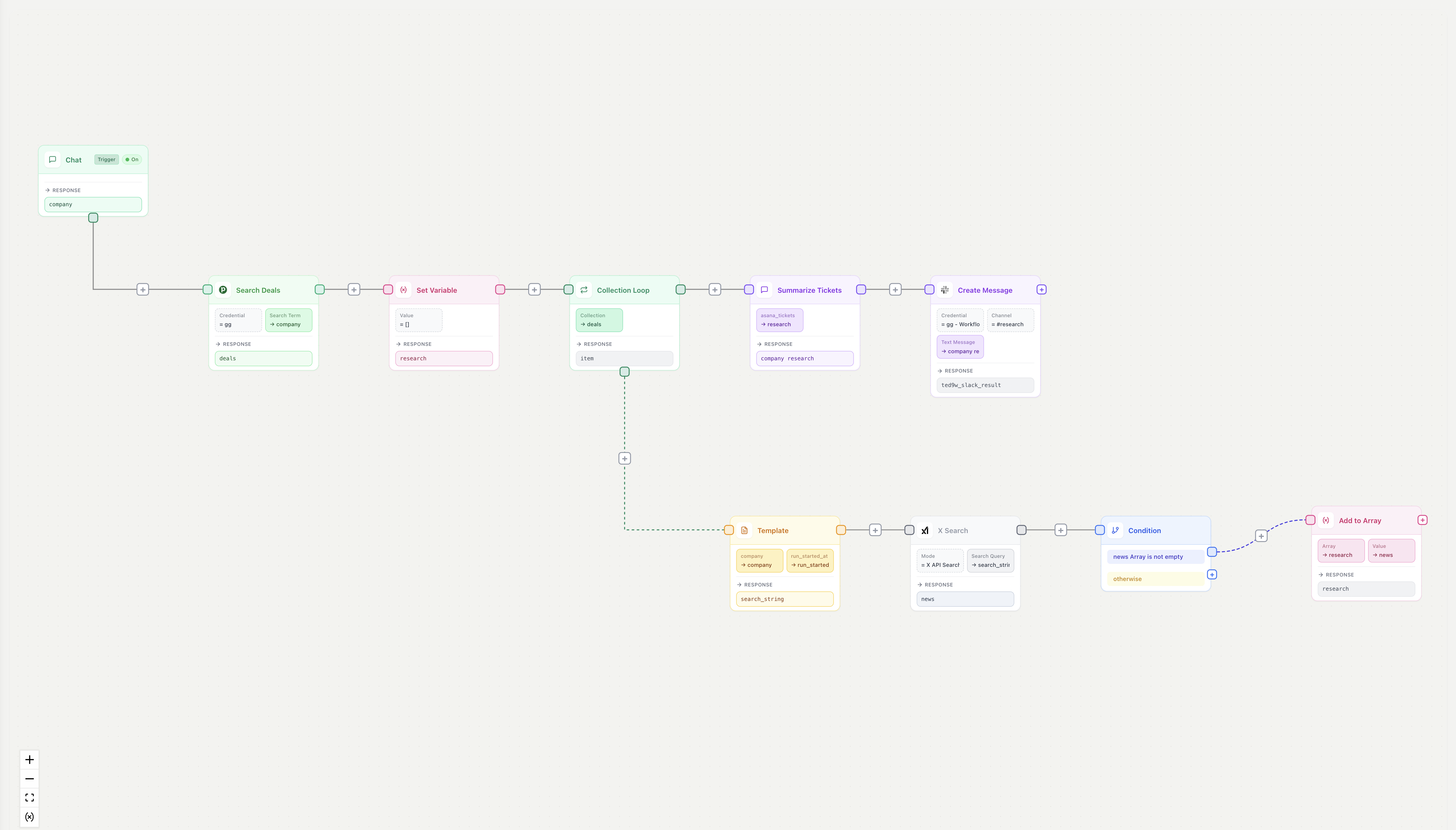
The rest of Aisle.
Tasks are the engine: you write the logic, and Aisle runs everything around it. The rest of the platform is where you build those Tasks, test them, and give them the models, prompts, and knowledge they run on.
Every model your team uses, in one place, sharing one history.
Chat with ChatGPT, Claude, Gemini, Grok, and more without juggling subscriptions. Upload files, search the web, fork a thread to try another approach, and share any conversation with the team.
Rewrite this so it is clearer for a non-technical reader, same length.
Claude Opus 5Tools & SettingsClaude Opus 5AnthropicClaude Sonnet 4.6AnthropicGPT-5.6OpenAIGPT-5.6 TerraOpenAIGemini 3 ProGoogleGrok 4xAIKimi K2MoonshotAIA shared prompt library you build once and run thousands of times.
Prompts are model-agnostic components: swap the model underneath without rebuilding, and reuse the same prompt across chat, Projects, Tasks, and the API. Every change is versioned, so you can see what moved and roll it back.
Claude Sonnet 4.6AnthropicStructured OutputFilesYou are an accounts-payable analyst. Auto-approve only when the supplier is approved, the total is within 2% of the PO, and the lines reconcile.
A shared workspace for one team, customer, or domain.
Bundle the prompts, tasks, connectors, and knowledge one area of the business needs. The project chat is an agent: it picks the right tool for what you ask, and spins up to ten sub-agents to run a chain of tasks in parallel.
Instructions
How the agent behaves in every chat here.You support the Northwind account team. Answer from the project's memories first.
- Quote contract terms with the clause number.
- Run account-brief before any renewal call.
 Slack
Slack Pipedrive2 Tasks2 Knowledge Bases
Test a prompt across every model at once, side by side.
Pass in a batch of inputs, compare the outputs, and see how each model handles the edge cases before you ship. Share the full test state as a link so the team picks up where you left off.
Refund-policy tone
1 variableGPT-5.6Reply to {{ticket}} in under 40 words.
Your order shipped on the 3rd, outside our 14-day window, so I can't refund it. I can send a replacement free.
Claude Opus 5Reply to {{ticket}} in under 40 words.
Sorry this missed the mark. The order left on the 3rd, past the refund window. Happy to replace it free.
Gemini 3 ProReply to {{ticket}} in under 40 words.
The item was dispatched on the 3rd and therefore falls outside the eligible fourteen-day refund period.
A knowledge base your tasks and chats read and write.
Upload documents, build a knowledge base, and ground any prompt, chat, or task in your own data with cited sources. Vector search and version history are built in, with no database to run.
northwind-msa-2026.pdf
Extracted Facts (18)
SearchablePayment terms are net 45 from the date of a valid invoice. Invoices disputed in good faith are not overdue while under review.
Service credits of 5% of monthly fees apply per full percentage point below the 99.5% availability target.
Liability is capped at the fees paid in the preceding 12 months, except for confidentiality breaches.
Ship your first system.
Open the editor, write a script against your connected accounts, and put it on a trigger. Or describe it, and the builder drafts the task as code you edit. Starter and Pro both begin with a 14-day free trial.