Model Providers
Control which AI models your organization can use. Open Org Settings and select the Enabled Models tab.
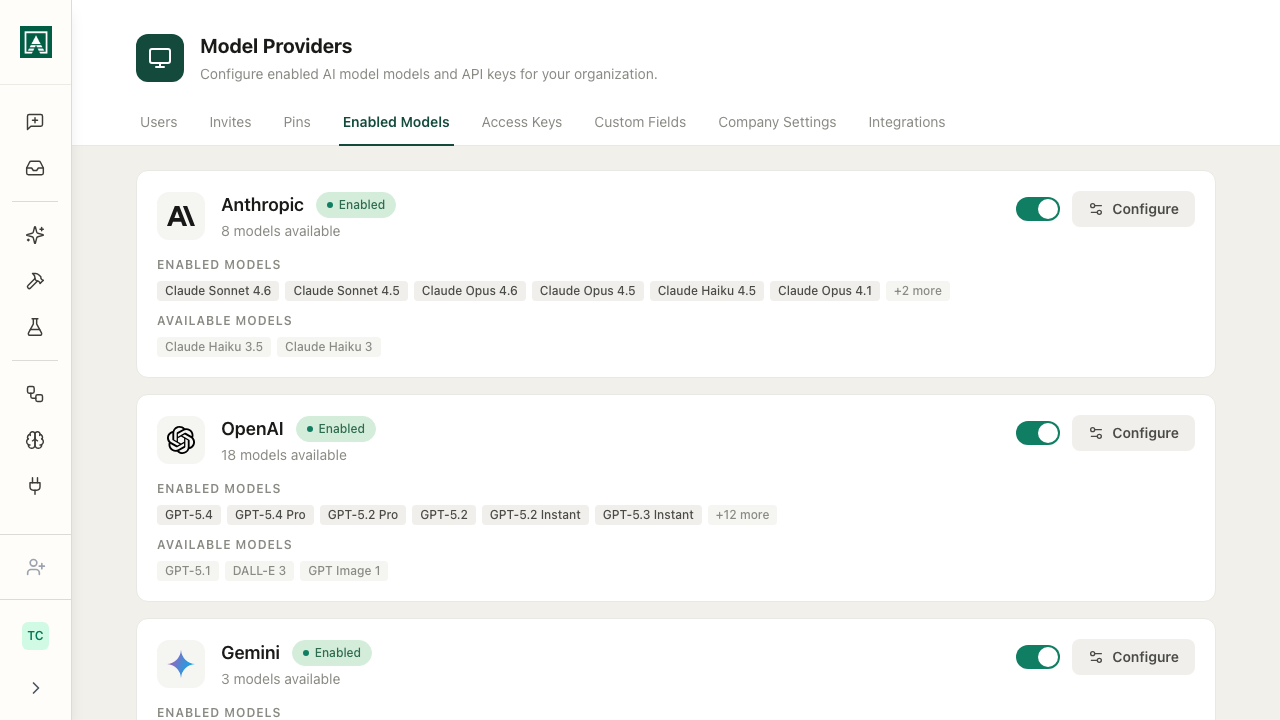
Providers include Anthropic, OpenAI, Gemini (Google), xAI, and OpenRouter (which routes to many models through one connection). Each provider is a card showing its status and which of its models are enabled.
Setting up a provider
Click Set Up on a provider you haven't configured yet (or Configure on one you have). A dialog opens where you:
- Enter an API key for the provider. Each provider card links out to where you generate a key (the OpenAI dashboard, the Anthropic console, and so on).
- Choose which of the provider's models to enable, using the checkboxes. Enable all selects every model at once.
Save to apply. A provider needs a valid API key before it can be turned on.
Some organizations start with Aisle-provided trial keys. The card shows how many days remain; add your own key before the trial ends to keep using that provider.
Enabling and disabling
- The toggle on a configured provider's card turns that whole provider on or off.
- To enable or disable individual models, open Configure and check or uncheck them.
Changes take effect immediately across the organization. When you disable a model, it disappears from the chat launcher for everyone; disabling a provider removes all of its models.
Reasons you might narrow the list: keep costs down by turning off expensive models your team doesn't need, reduce clutter so people aren't choosing between near-identical options, or exclude models that don't meet your compliance requirements. Reasons to enable more: different models suit different work, and you may want to let people compare a new model in Playgrounds before adopting it.
Using your own API keys
Adding your own key (rather than relying on Aisle's) means usage shows up on your provider dashboard, you get your own rate limits, and API calls run through your account for auditing. Enter the key in the same Set Up / Configure dialog; it takes effect immediately, and all calls for that provider then use your key.