Saving and Sharing Playgrounds
What gets saved
Saving a playground captures a complete snapshot:
- Version configurations - which prompts, revisions, models, and settings were loaded
- Variable values and any attached files
- Outputs - the results from each version
Saved outputs persist indefinitely. You can return to a playground months later and the results are still there.
Saving
Click Save in the playground toolbar (Create the first time). A new playground is created with an auto-generated name, so you don't need to name it up front.
To rename it, click the title at the top of the editor, or open the Settings tab to edit the name and description. Give it a name that says what you were testing:
- "Customer Feedback Analyzer - v12 vs v13"
- "Article Summarizer - GPT-4 vs Claude comparison"
- "Support Classifier - temperature 0.3 vs 0.7"
Sharing
Open the Sharing tab to control who can access the playground:
- Private - only you (and anyone you invite directly)
- View - anyone in your organization can open it, read-only
- Edit - anyone in your organization can open and change it
Once organization access is on, copy the URL from your browser and send it to a teammate. They open the same view you saved: the versions, variables, and outputs. Viewers without edit access see it read-only.
Accessing saved playgrounds
Open Playgrounds under Tools in the left sidebar. Your saved playgrounds appear in a list, filterable by owner. Click any to open it.
Deleting
Delete a playground from the list (row menu) or from within the playground itself. Deletion is permanent - outputs are not recoverable.
Worked example: comparing prompts side by side
A common reason to open a playground is to compare two prompt configurations directly — two revisions of the same prompt, or the same prompt against different models — and then keep the result as a shared record of the decision. The steps below walk through that flow end to end. For the full interface, see Playgrounds.
- Open a playground. In the left sidebar, expand Tools, click Playgrounds, then New Playground. A playground opens with one empty version.
- Load the first version. Click the prompt card, choose a model and write a prompt — or use Add Version → Load Saved to pull a prompt and revision from your library.
- Add a version to compare against. Click Add Version. To compare revisions, load a different revision of the same prompt. To compare models, clone the first version and change its model.
- Enter your variables. Any
{{variable}}in a prompt appears in the Variables panel. Values there are shared across every version, so each one runs on the same input. - Run All. Every version runs at once, and the output streams into each version's Response area.
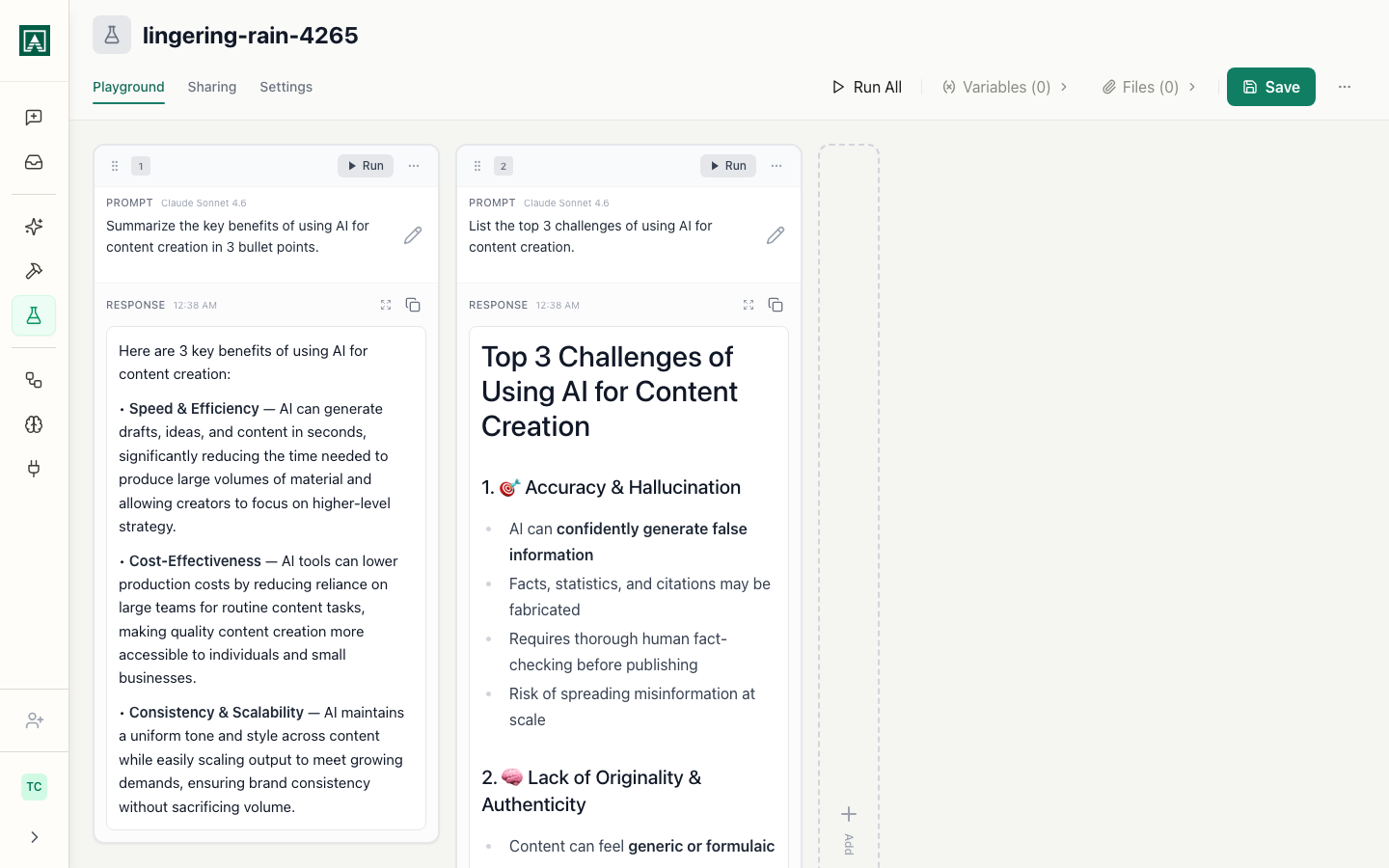
Read the outputs side by side. The versions stay in the order you added them; scroll horizontally if they extend past the viewport.
Then Save the playground and, on the Sharing tab, set organization access to View and share the URL. Anyone in your organization opens the same versions, variables, and outputs you saw — the outputs are stored, not regenerated when someone reopens it. That makes a saved playground a durable record you can link from a pull request, a Notion doc, or a Slack thread to show the evidence behind a prompt or model choice.