A lot to cover this week, so let's dive right in.
Prompt Builder: Now Accepts Files
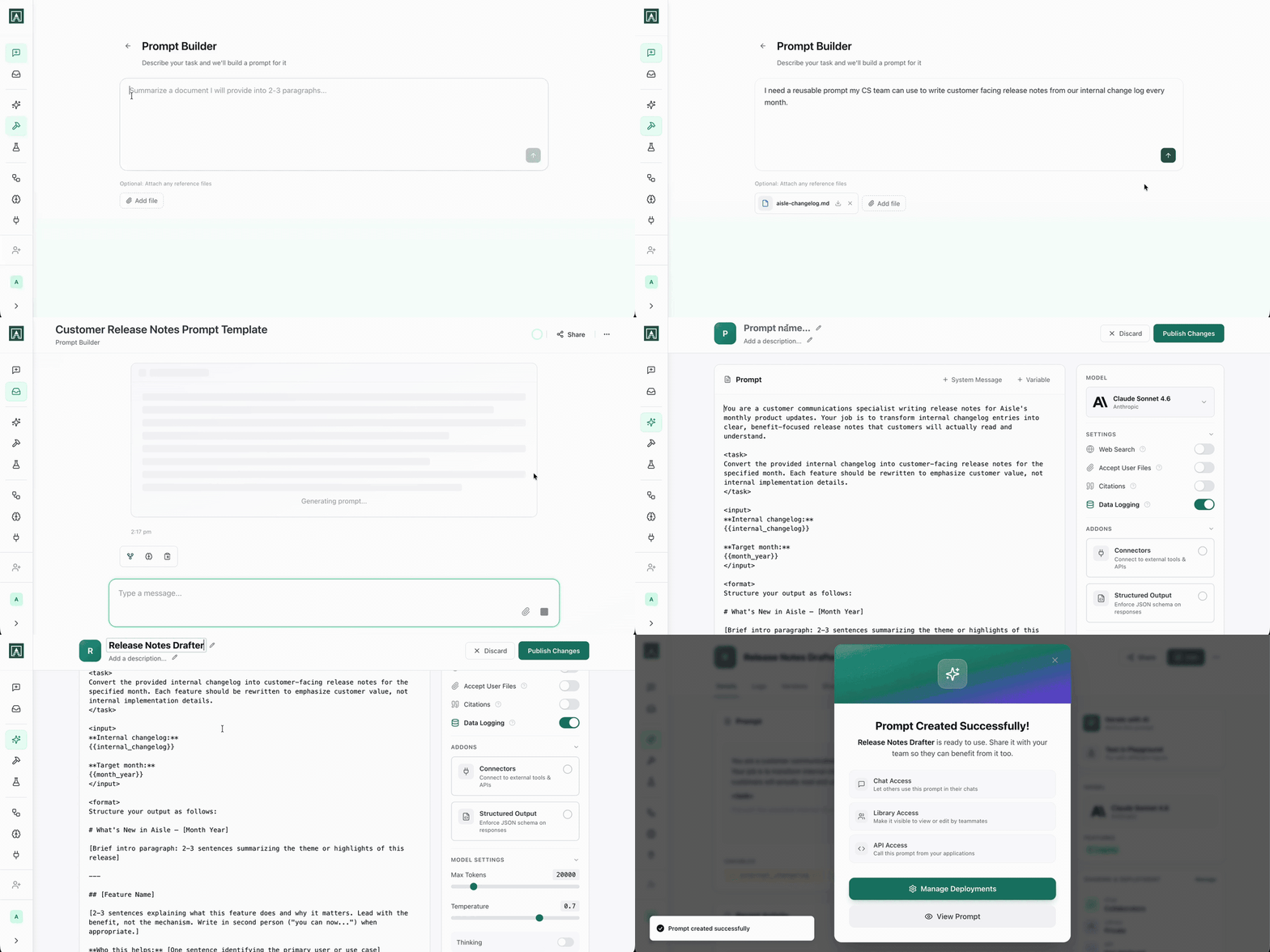
You know what you need a prompt to do. Getting it structured correctly is the part that slows you down.
Describe the task in plain language and Prompt Builder produces a fully structured prompt, formatted the way Aisle runs prompts across chat, workflows, and API. Variables are created automatically. From there it's a conversation: refine the output, adjust the behaviour, tighten the scope. When it's right, add it to your library directly. New to prompts? The Building Your First Prompt guide has you covered.
It works on existing prompts too. Open any prompt from its settings page and use Prompt Builder to improve it: sharper instructions, restructured variables, updated for a new use case. No starting from scratch.
The latest update adds file uploads. Feed it examples of good output like past reports, approved copy, and it uses those as a benchmark when refining your instructions. If you've been trying to describe what "good" looks like in words, this is better. Show it instead.
Integrations: Fathom, Fireflies via MCP, and More Slack
Three workflow integration updates:
Fathom Now available in workflows and MCP. Pull meeting recordings and transcripts directly into your automations.
Fireflies Already had workflow support. Now also available as an MCP connector, so you can access it from Claude Code, Cursor, or any other MCP-compatible tool your team uses.
Slack The workflow integration now supports get_conversation_history, get_conversation_replies, list_users, list_conversations, get_conversation_info, and get_conversation_members. If you've been building Slack-connected workflows and hitting the edges of what was possible, most of those edges just moved.
Workflow Scripts: Now with Python (and a Generator)
Scripts in workflows now support Python alongside Ruby. If your team lives in Python, you no longer need to translate logic into another language just to get it into a workflow. Write what you know, connect it to the rest of the graph.
We also shipped a Script Generator. Describe what you need the script to do, and it writes the code for you, in either Python or Ruby. It's particularly useful for one-off transformations where you know the logic but don't want to write boilerplate-when you don't need custom code at all, the 30 variable operations we shipped recently cover most cases. The generator handles the structure; you adjust from there.
Document Splitter: More Formats
The Document Splitter node, which you use to break large documents into chunks before passing them into a prompt, now accepts .pptx and .docx in addition to the formats it already handled. If you're running workflows over slide decks or Word documents, you can now feed them directly into the splitter without converting anything first.