Build AI workflows around prompts, not plumbing
Drag-and-drop canvas for prompt chains, branching logic, and model selection. Deploy to chat, API, or schedule. No code, no infrastructure.
Works with every model
 Anthropic
 OpenAI
 Gemini
 xAI
xAI OpenRouter
 Amazon
 Perplexity
 MoonshotAI
 Meta
Meta Qwen
Qwen
AI workflows built around prompts and reasoning
Most automation tools bolt AI onto generic data pipelines. Aisle starts with the prompt.
Version-controlled prompts
Change a prompt once and every workflow using it updates. No hunting through node configs.
Any model per node
Use Claude for analysis, GPT for drafting, Gemini for summarization. Switch models with a dropdown.
Branching, loops, and logic
Route to different prompt chains based on classification. Retry failed steps. Handle exceptions visually.
Persistent memory
Workflows remember past results. A monitoring workflow deduplicates. A research pipeline picks up where it left off.
Full execution logs
See exactly which prompt version ran, what inputs were sent, and what the model returned. Every time.
Team sharing and permissions
Editors refine prompts. Operators run workflows. Admins control model access. Everyone has the right level of access.
See how it works
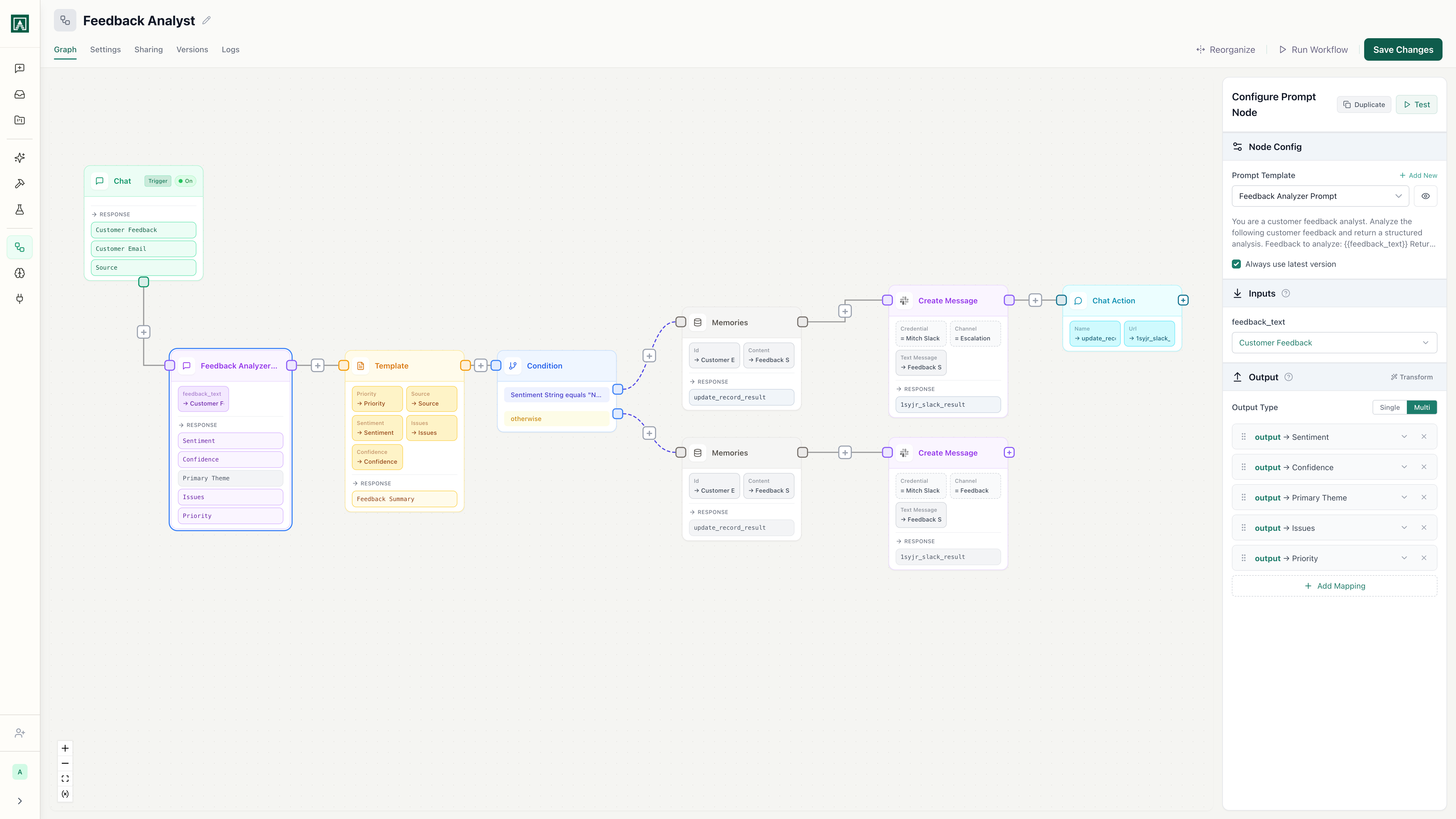
Prompt chains on a visual canvas
Drag prompts onto a canvas and connect them. Each node runs a versioned prompt with its own model, variables, and output schema. Branch based on AI classification. Loop until a condition is met. No code, no YAML, no JSON configs.
See it in actionPick any model per node
Use Claude for nuanced analysis, GPT for structured extraction, Gemini for summarization — all in the same workflow. Switch models with a dropdown. Your prompts work across any provider without changes.
See it in actionDeploy to Slack, JIRA, API, or schedule
The same workflow runs from a Slack command, a JIRA webhook, an API call, or a cron schedule. One source of truth for the logic. Deploy once, trigger from anywhere.
See it in actionEnterprise controls without enterprise complexity
Governance, audit, and access controls built in from the start.
Scoped access per prompt
Control who can edit prompts, run workflows, and access which models. Role-based permissions from day one, not an enterprise add-on.
Execution logs on every run
Full trace of every workflow execution: which prompt version ran, what inputs were sent, what the model returned, and how long it took. Exportable for compliance.
Admin model controls
Set which models are available to your organization. Control costs by restricting expensive models to specific teams or use cases. Track spend per team, per workflow.
Five reasons to switch from ad-hoc to AI workflows
Works with the tools you already use
 Slack
Slack GitHub
 Jira
Jira Google Drive
 Gmail
Gmail Outlook Mail
 PostgreSQL
 AWS Bedrock
 Azure SQL
 Asana
Asana Airtable
 Gong
Gong Pipedrive
 AffinitySlackGitHubJiraGoogle DriveGmailOutlook MailPostgreSQLAWS BedrockAzure SQLAsanaAirtableGongPipedriveAffinity
 Mixpanel
 Supabase
 Fireflies.ai
 Fathom
 Ahrefs
 Semgrep
 SERP API
 Google Maps
 Reddit
 X (Twitter)
 xAI Grok Search
 CoinGecko
 DeepWiki
 SupadataMixpanelSupabaseFireflies.aiFathomAhrefsSemgrepSERP APIGoogle MapsRedditX (Twitter)xAI Grok SearchCoinGeckoDeepWikiSupadata
AI workflows built for reasoning, not just routing.
Prompt-first automation with model selection, version control, and enterprise governance.