Microsoft Copilot works inside Microsoft. Your work doesn't stop there.
Copilot is AI inside the tools you already pay for. That sounds convenient until you need it to touch Slack, pull from your CRM, run on a schedule, or let your team actually build something custom. Aisle is AI infrastructure for your whole operation: every model, every tool, every workflow, built and owned by your team.
Start a chat
 Claude Sonnet 4.5Claude Opus 4.5
 GPT-4oo3
 Gemini 2.5 Pro
 Grok 4.20
Recents
Library


Why teams are looking beyond Copilot
You're already paying for Microsoft 365. Copilot came with it, or almost. For some tasks it does exactly what it says. But the problems teams are experiencing aren't small gaps. They're structural, and they're well-documented.
It tells you how to do things instead of doing them
The most common complaint from actual Copilot users: it provides instructions rather than executing tasks. You ask it to schedule a meeting, it tells you the steps. You ask it to update your CRM, it explains how. Copilot is built as a chat assistant, not an execution layer.
Aisle vs. Microsoft Copilot
Copilot is AI chat inside Microsoft 365. Aisle gives you chat, workflows, and a shared prompt library in one platform, connected to your whole stack.
| Feature | Aisle | Copilot |
|---|---|---|
| Models available | GPT-5, Claude Opus 4, Gemini 2.5, Grok, and more | GPT-5, Claude Sonnet 4, Claude Opus 4.1 |
| Integrations | 50+ native connectors | Microsoft 365 apps only |
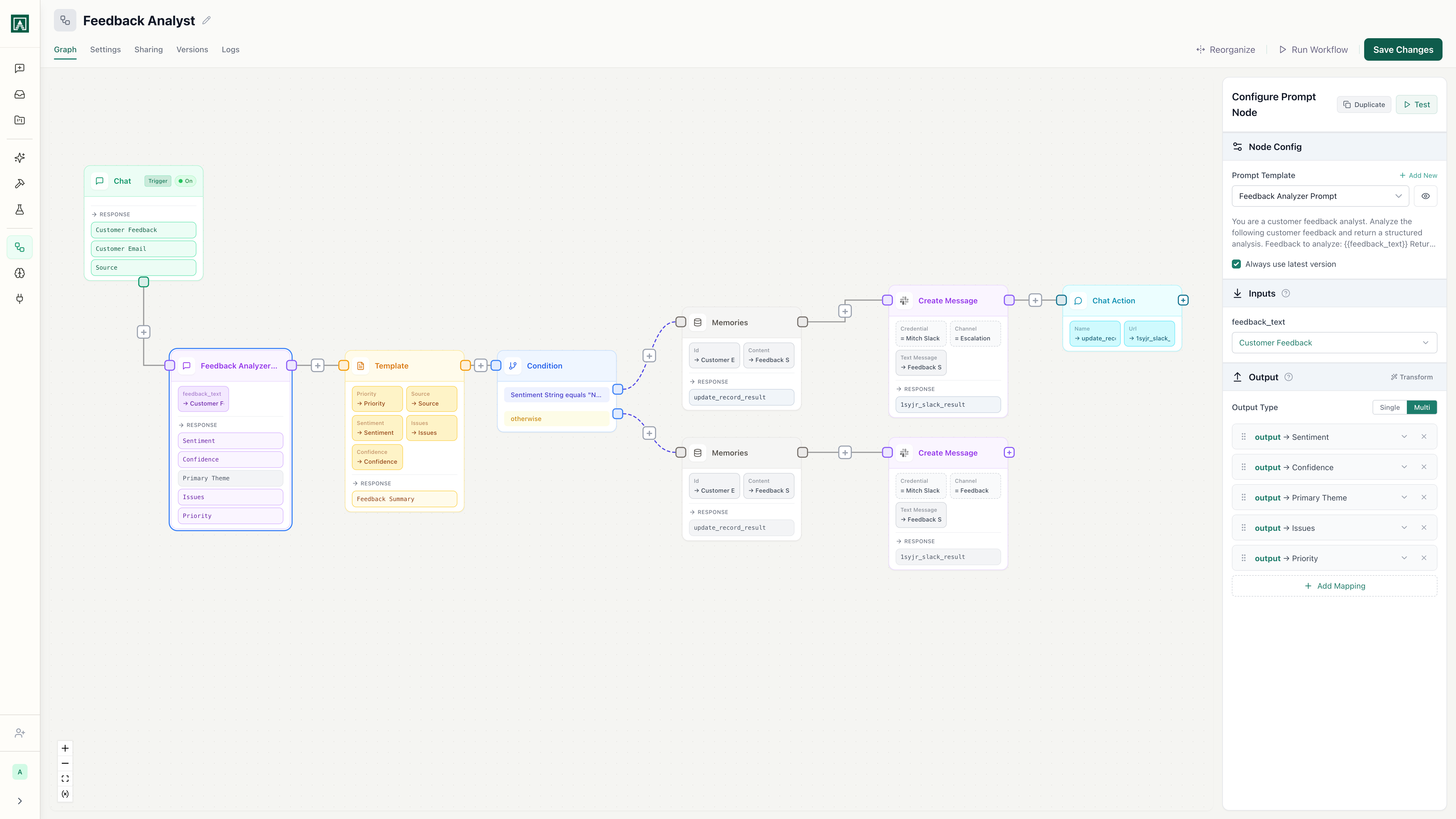
| Build custom workflows | Yes, visual canvas, no code required | No |
| Schedule automations | Yes, runs on any cadence | No |
| Shared prompt library | Yes, versioned and team-wide | No |
| Prompt version control | Yes: diff, compare, roll back | No |
| Works outside M365 | Yes | No |
| Use your own API keys | Yes (Pro and up) | No |
| Visible usage logs | Yes, per prompt, per workflow, per user | Limited |
| Single product | Yes | Needs Copilot Studio to unlock full potential |
*Copilot Studio is Microsoft's separate workflow/agent building platform. It requires separate licensing, separate learning, and separate IT setup.
AI chat vs. AI infrastructure
Copilot gives you AI chat.
AI chat is responsive. You ask, it answers. Copilot does this well for drafting emails, summarizing meetings, and answering questions inside Microsoft 365. Microsoft has built those use cases well within those boundaries.
Aisle gives you AI infrastructure.
AI infrastructure is the layer underneath your team's work. The place where you build workflows that actually run, store the prompt logic your team has figured out, connect to the systems you use regardless of vendor, and track what's happening over time. It doesn't belong to any single conversation. It belongs to your organization.
The question isn't which one is better. It's which one solves your problem. If you want AI that summarizes your meetings, Copilot probably does that already. If you want to build workflows that run, connect, and compound, that requires infrastructure.
What you can build on Aisle that Copilot can't do
Real workflows teams run on Aisle today.
Daily sales briefing, fully automated
Every morning at 7 AM, a workflow pulls the previous day's Salesforce activity: new leads, pipeline changes, notes from calls. A prompt summarizes it and flags the three accounts that need attention. The summary posts to a Slack channel before the team's first standup.
No one types a prompt. No one logs into Salesforce. The team gets the same briefing every day, and the prompt that generates it is versioned and editable by whoever owns it.
Copilot doesn't touch Salesforce without custom connectors in Copilot Studio. It doesn't run on a schedule without Copilot Studio. It doesn't post to Slack without Copilot Studio. This workflow requires a second product, a second interface, a second learning curve, and custom development work.
Support ticket triage without the manual sorting
A webhook fires every time a ticket lands in your Gmail support inbox. A prompt reads the email, classifies it by urgency and topic, and routes it: billing questions go to one Slack channel, technical issues go to another, anything marked urgent triggers a notification to the on-call person.
This runs on managed infrastructure, not someone's laptop. When a new type of ticket starts showing up, you update the classification prompt. One edit, one save, no redeployment.
Copilot can read emails inside Outlook, but it doesn't classify, route, or act on them automatically based on logic you define. Copilot Studio could handle parts of this with Power Automate, but you're now building across multiple products with separate licensing and integration complexity.
Competitor monitoring on a cadence
A scheduled workflow runs Monday mornings and scans Google News and Reddit for mentions of your competitors and key industry topics. A prompt extracts what's relevant and filters out noise. Results land in a Slack channel with a summary your team can read in two minutes.
Persistent memory means the same article doesn't surface twice. The prompt that defines "what's relevant" lives in Aisle's shared library. Your team can tune it.
Copilot doesn't run scheduled tasks. It doesn't browse external sources beyond Bing. It doesn't share outputs to Slack. It doesn't maintain memory across runs. Copilot Studio can handle some of this with extensive configuration, but it's a different product, different setup, different complexity.
Frequently asked questions
You're not replacing Microsoft 365. You're adding infrastructure that works across your whole stack, not just inside it. Aisle connects to Gmail, Outlook, Slack, GitHub, Jira, Google Drive, Asana, Airtable, Pipedrive, Gong, and more. If your work already lives in multiple tools, one tool's AI layer won't cover it. Aisle fills that gap. Many teams use Copilot for Microsoft-specific tasks and Aisle for everything else. They complement each other.
Yes, and it's a capable product. But it's a separate purchase, a separate interface, and a separate learning curve from the Copilot you're already paying for. Most teams who buy Microsoft 365 Copilot don't realize they need Studio to build the workflows they actually want. Even with Studio, you're limited to Power Platform connectors, and many enterprise tools require custom development. Aisle gives you chat, workflows, and shared prompts in one product, one interface, one price, with native integrations already built.
Yes. You build workflows on a visual canvas with drag-and-drop components. You create and save prompts through a UI. Scheduling is a dropdown. The parts that require code (data transformation, custom logic between steps) support JavaScript and Python, but most workflows don't need any. Your team's AI builder doesn't need to be a developer.
Simpler to start, yes. But "built in" also means "locked in." You get the workflows Microsoft decides to allow (unless you add Studio), the integrations Microsoft decides to support (unless you add Studio and build custom connectors), and conversations that don't compound into shared team knowledge. Microsoft's own actions tell the story: they made Copilot optional in Windows 11 and pulled back integrations from Photos and Notepad. If your needs fit inside those constraints, that works. If they don't, you hit a wall quickly.
That's a reasonable setup. Copilot is useful for in-meeting summaries and quick drafts inside M365 apps. Aisle handles everything that needs to reach outside that environment, run automatically, or live in a shared, versioned library. They're solving different problems and can coexist.
The free trial starts immediately. No sales call required. Most teams have their first workflow running within a day. A scheduled Slack briefing can be built and deployed in under an hour. A multi-step support triage workflow might take a day to get right.
Aisle never trains on your data. All prompts and outputs stay within your environment. You control permissions at a granular level, usage logs are visible in real-time, and you can bring your own API keys to route usage through your own provider accounts. In Copilot's architecture, Concentric AI found 16% of business-critical data gets overshared and security labels don't always inherit properly. Aisle uses explicit permission controls by default.
Works with the tools you already use
 Slack
Slack GitHub
 Jira
Jira Google Drive
 Gmail
Gmail Outlook Mail
 PostgreSQL
 AWS Bedrock
 Azure SQL
 Asana
Asana Airtable
 Gong
Gong Pipedrive
 AffinitySlackGitHubJiraGoogle DriveGmailOutlook MailPostgreSQLAWS BedrockAzure SQLAsanaAirtableGongPipedriveAffinity
 Mixpanel
 Supabase
 Fireflies.ai
 Fathom
 Ahrefs
 Semgrep
 SERP API
 Google Maps
 Reddit
 X (Twitter)
 xAI Grok Search
 CoinGecko
 DeepWiki
 SupadataMixpanelSupabaseFireflies.aiFathomAhrefsSemgrepSERP APIGoogle MapsRedditX (Twitter)xAI Grok SearchCoinGeckoDeepWikiSupadata
Start building the AI layer for your whole operation.
Multi-model chat, a shared prompt library, and custom workflows that connect to the tools you actually use, not just the Microsoft ones. 14-day free trial. No credit card. If it doesn't fit, you haven't lost anything.